 SwingDraw
How to review a clubhead path on iPhone.
SwingDraw’s Clubhead Path overlay helps you follow club movement through a recorded swing. Use it alongside the original video: a trace on a two-dimensional image does not measure the club’s three-dimensional delivery or predict ball flight.
Start with the club visible
Open a clear swing from Library. A steady down-the-line recording is useful for examining how club movement appears from behind the golfer. Keep the whole club in frame, including the top and finish. If you want to compare sessions, repeat the camera position and use the same club.
See the camera setup guide before drawing conclusions from a different viewpoint.
Review the trace in four steps
- Find one phase. Pause at the takeaway, top, or delivery rather than trying to judge the entire swing at once.
- Turn on Clubhead Path. Inspect the trace together with the visible club, not as an isolated curve.
- Step through nearby frames. Check whether the trace follows the clubhead as the video advances. A clean-looking curve is not proof that every point was tracked correctly.
- Keep the useful evidence. Use Save Photo for a checkpoint or Save Video for movement. Review the export before sharing it.
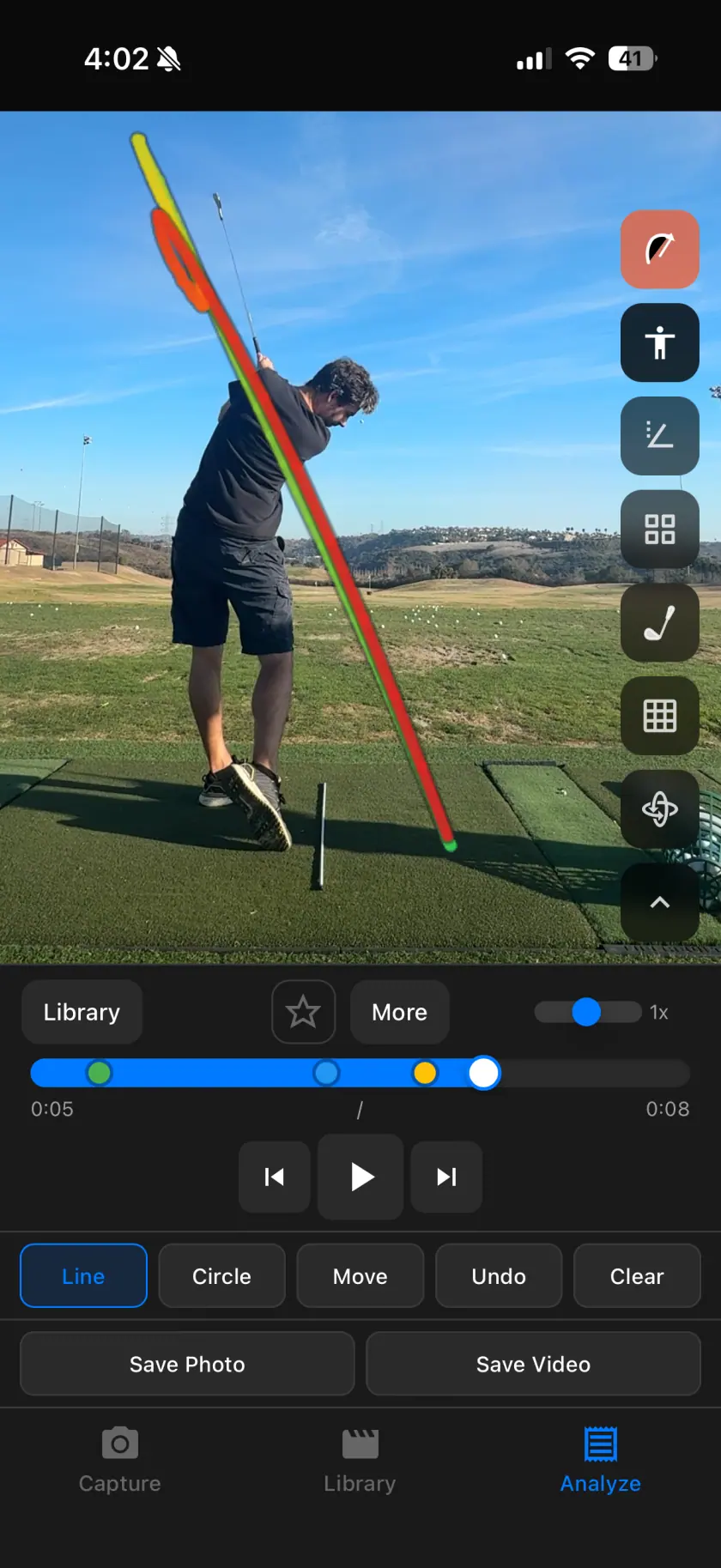
If the path looks wrong
| What you see | What to check | What to do next |
|---|---|---|
| A gap in the trace | Is the club obscured or outside the frame? | Inspect the original frames. Do not interpret a missing trace as a missing movement. |
| A sudden jump | Is the club blurred or difficult to distinguish from the background? | Check frames before and after the jump. Use manual review where the overlay does not match. |
| A different curve in a second clip | Did the camera position, framing, club, or swing phase change? | Match those conditions before treating the difference as progress. |
Path tracking and plane lines answer different questions
A path trace follows movement over time. A plane line is a reference you draw on a frame. Use manual shaft-plane lines when you need a fixed checkpoint, and side-by-side comparison when you want to inspect two attempts.
What this cannot tell you
The picture changes with the camera. A trace does not establish an exact club-path angle at impact, face angle, swing speed, or ball spin. Save observed ball flight as a separate note and use qualified instruction when you need a diagnosis.
The path tools are included in SwingDraw’s one-time purchase, alongside drawing, comparison, and exports.
Your next range session,
on the record.
Record or import a swing, mark the frame that matters, and compare it with last week. Every tool is included.