 SwingDraw
Show students what you see.
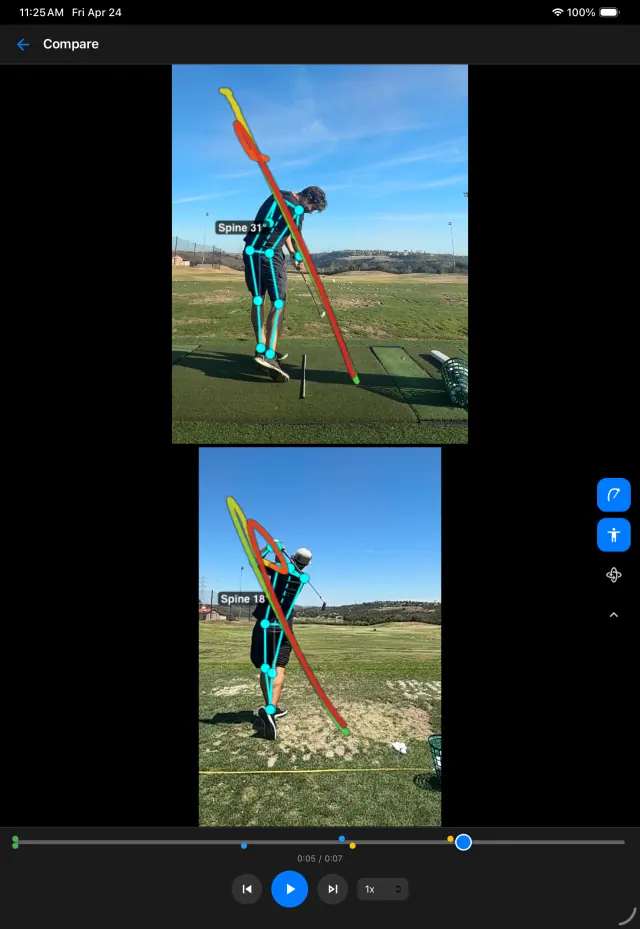
SwingDraw is a lesson-tee video tool: film or import a swing, draw the line you are talking about, put it next to last week’s swing, and send the marked frame home with the student.
A lesson-tee workflow in four taps
- Film the swing. Record a range session in SwingDraw or import from Photos. Range sessions detect the swings and let you trim and keep the useful ones.
- Mark it. Draw a shaft-plane line at address, circle the head, or measure an angle. Turn on swing path or body tracking when it supports your point.
- Compare. Open the swing next to the student’s earlier one and step both through the same phase.
- Send it. Save Photo or Save Video, then share it through the student’s usual app with one sentence about the feel to practice.
Why coaches pick a simple tool
- No per-student cost. $14.99 once, whether you teach three students or three hundred.
- No student sign-up. Nobody needs an account to receive a marked clip.
- Private by default. Videos stay on your device. The App Store privacy label is “Data Not Collected”, which matters when you film juniors.
- Fast. Drawing tools are on screen next to the video, with Move, Undo, and Clear one tap away.
Where SwingDraw is not enough
SwingDraw is not a coaching business platform. There is no remote-lesson inbox, voice-over lesson recording, shared student library, cloud backup, or billing. If you teach remotely or run an academy, a subscription platform is the right tool:
- OnForm: coach plans from $19.99/month or $199.99/year, with a free athlete plan connected to a coach.
- CoachNow: PRO at $49.99/month or $499/year, built around coach–athlete spaces.
- V1 Golf / V1 Pro: an established golf-instruction ecosystem with remote lessons.
Many coaches use both: a platform for remote work, and a fast on-device tool on the tee. Prices checked September 25, 2026; see the full comparison for sources.
Coach questions
Do my students need SwingDraw too?
No. Export a marked frame (Save Photo) or an annotated clip (Save Video) and send it through Messages, email, or whatever app you already use. Students only need to watch the video.
Is there a coach dashboard or student accounts?
No. SwingDraw has no accounts, cloud storage, or messaging. If you run remote lessons or need a shared student library, a coaching platform like OnForm, CoachNow, or V1 is built for that.
Can I use it on an iPad on the lesson tee?
Yes. One purchase covers iPhone and iPad. The iPad screen gives side-by-side comparisons and drawings more room.
How many students can I use it with?
There is no student limit and no per-student fee. The library simply grows on your device, so tag each swing with the student’s name.
Mark it. Compare it.
Send it home.
A lesson-tee video tool with no per-student fees, accounts, or uploads.