 SwingDraw
Find your rhythm on video.
Tempo is the timing between the parts of your swing. SwingDraw measures it from your own video as a backswing-to-downswing ratio, so you can see when you rush.
How the ratio is calculated
SwingDraw detects three moments in the swing: address, the top of the backswing, and impact. The backswing is address to top; the downswing is top to impact. Divide one by the other and you get a ratio such as 2.3:1, shown with the swing’s notes, tags, and voice note.
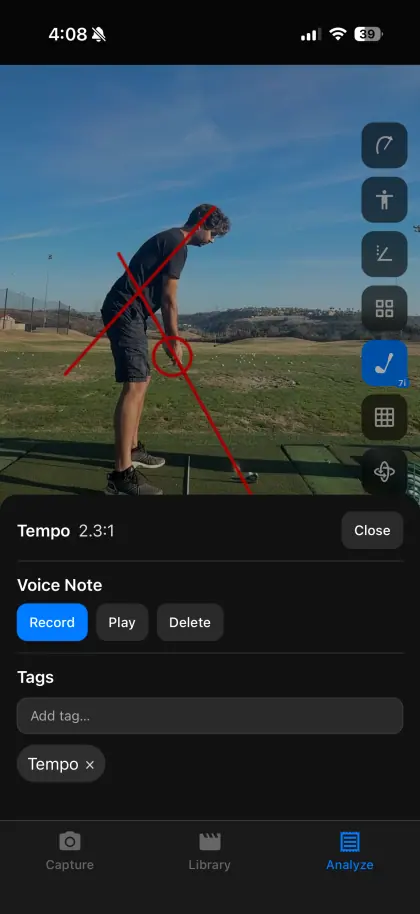
Use it to compare yourself
- Record five swings with a relaxed rhythm and five when you try to hit it hard. Compare the ratios.
- Tag swings “good tempo” and star them, then compare a rushed swing side by side.
- Record in slow motion. At 30 fps the downswing is only a handful of frames, so one frame changes the ratio noticeably.
Limits
Tempo depends on automatic phase detection. If address or the top is picked a frame or two differently, the ratio shifts. SwingDraw does not play a metronome or tempo tones, and it does not measure club speed. Treat the ratio as a way to compare your own swings filmed the same way.
Tempo questions
What is a good golf swing tempo ratio?
Many instructors describe a backswing that takes roughly three times as long as the downswing (about 3:1), but golfers vary. Use your own ratio to spot changes, for example when you rush under pressure.
How does SwingDraw measure tempo?
It uses the detected address, top-of-backswing, and impact frames. Backswing time (address to top) divided by downswing time (top to impact) gives the ratio, shown to one decimal place.
Why is no tempo shown for some swings?
The ratio only appears when all three positions are detected. A cropped club, a very short clip, or heavy blur can prevent that.
Does frame rate matter?
Yes. The downswing is short, so a 30 fps video has few frames to measure. Record in slow motion (120 or 240 fps) for steadier numbers.
Your next range session,
on the record.
Record or import a swing, mark the frame that matters, and compare it with last week. Every tool is included.