 SwingDraw
Film the swing. Keep the history.
Junior swings change fast. SwingDraw gives parents a simple way to film practice, keep each season’s swings organized, and hand the coach a clear clip, without ads, accounts, or another subscription.
What a parent actually needs
- A steady, repeatable video. A tripod behind the hands (down-the-line) or facing the chest (face-on), at the same distance each time. The recording guide shows the setup.
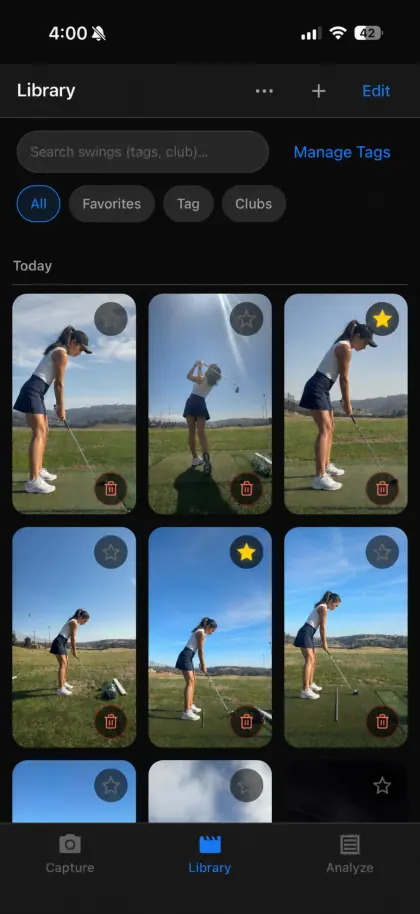
- A place to keep it. The swing library holds thumbnails, dates, tags, favorites, and club filters, so the 7-iron from spring is easy to find in autumn.
- A clean way to share. Save a marked frame or clip and send it to the coach with one question.

Growth you can see
Put last season’s swing next to this one and step both from address. Height, strength, and new equipment all change a junior’s swing; seeing the two side by side keeps the conversation with their coach concrete.
Designed to stay out of the way
- No ads, no in-app purchases, no upsell screens for a child to tap.
- No account, profile, or chat.
- App Store privacy label: “Data Not Collected”.
- One $14.99 purchase, shareable with up to six family members.
Parent questions
Is SwingDraw safe for kids to use?
SwingDraw is rated 4+ on the App Store. It has no ads, no account, no chat or social features, and it collects no data. Videos stay on the device unless someone exports them.
Can the whole family share one purchase?
Yes. SwingDraw supports Family Sharing for up to six family members, so a parent and a junior golfer can each install it on their own device.
Will it tell my child what to fix?
No. SwingDraw shows the swing clearly; it does not grade it or prescribe drills. That is intentional for juniors: bring the marked clip to their coach rather than letting an app give them swing thoughts.
Can I compare this season to last season?
Yes. Keep swings in the library, tag them by club and date, and open any two side by side. Film from the same angle each time so the comparison is fair.
Every season’s swing,
in one place.
No ads, accounts, or subscription. Family Sharing supported.