 SwingDraw
Golf swing analyzer apps, compared by the job you need done.
There is no single best golf swing app. Some show you the swing; some tell you what to fix; some connect you with a coach. Pick the job first, then compare the price of the plan that actually does it.
Short answer
- SwingDraw if you want to see and mark your own swing (path, body, head, lines, angles, side-by-side) for $14.99 once, with videos kept on your device.
- V1 Golf if you want a free starting point with drawing and comparison, and optional paid overlays, model swings, and remote lessons.
- GolfFix or 18Birdies Premium if you want an AI to flag faults and suggest drills.
- Sportsbox 3D Golf if you want 3D body measurements (turn, sway, tilt) from phone video.
- Swing Profile if you practice alone and want hands-free automatic capture and replay.
- OnForm or CoachNow if you are a coach (or a coached student) working remotely.
Side-by-side
“Documented” means the publisher describes the feature; plan requirements are noted where the publisher states them. Swipe the table sideways on a phone.
| App | Main job | Cost for full features | Draw & compare your video | Automatic analysis |
|---|---|---|---|---|
| SwingDraw | Visual self-review | $14.99 once; no IAP | Yes, all included | Overlays only: club path, body, head, tempo. No grading. |
| V1 Golf | Instruction ecosystem | Free tier; Golf+ $9.99/mo or $69.99/yr; Advanced V1sion $119.99/yr | Free: import, drawing tools, compare | Golf+: overlay, skeletal tracking. Advanced: hand and ball trace. |
| OnForm | Coach–athlete video | Individual Standard $9.99/mo or $99.99/yr; Premium $14.99/mo or $149.99/yr; coach plans from $19.99/mo | Documented | 2D skeleton on most tiers; 3D on Premium and Coach Pro |
| Sportsbox 3D Golf | 3D body measurement | Free demo tier; App Store lists 3D Player $15.99 / $109.99 and 3D Pro $79.99 / $799.99 | Free tier includes drawing tools and 2D/3D comparison | 3D trackers such as turn, sway, lift |
| 18Birdies | GPS & scoring, plus AI swing | Premium $19.99/mo or $99.99/yr (AI Swing Analyzer requires Premium) | Not verified | AI swing rating, faults, drills |
| Swing Profile | Hands-free auto capture | Free (3 saved recordings); Elite $8.99/mo or $49.99/yr on its site (App Store lists other Elite prices) | Documented; auto-synced side-by-side | Auto swing detection, auto plane lines, ball tracking |
| GolfFix | AI fault detection | App Store: Advanced $14.99/mo or $99.99/yr | Not verified | AI fault detection with suggested fixes |
| CoachNow | Multi-sport coaching | Analyze $9.99/mo or $59/yr; PRO $49.99/mo or $499/yr | Documented | AI skeleton and joint angles |
SwingDraw: see your swing, pay once
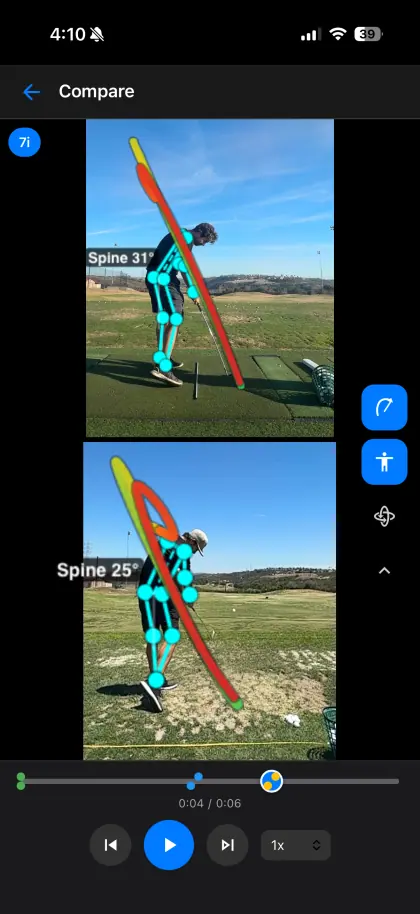
SwingDraw (version 3.1.8) records or imports swing video, steps frame by frame, and adds three kinds of reference: an automatic clubhead path trace, on-device body tracking with spine angle and a Head Stability score, and your own lines, circles, and angles. Two saved swings can play side by side. Swings live in a library with tags, club filters, favorites, voice notes, and a tempo ratio, and export as marked photos or videos.
Better fit elsewhere if: you want the app to tell you what is wrong, you want 3D numbers, you need remote lessons, or you use Android. SwingDraw does none of those.
V1 Golf: best free starting point
V1 Golf is a long-running golf video app with a large instruction ecosystem. Its April 2026 FAQ lists importing, drawing tools, and side-by-side comparison as free. Golf+ ($9.99/month or $69.99/year on the App Store) adds the overlay tool and skeletal tracking; Advanced V1sion ($119.99/year on V1’s site) adds hand and ball trace. Paid coaching memberships connect you with V1 instructors.
Choose it over SwingDraw if you want model swings, ball trace, or remote lessons, or if the free tier already covers what you need.
OnForm: built for coaches and their students
OnForm’s current plans start with a free Individual Basic tier, then Individual Standard at $9.99/month or $99.99/year and Premium at $14.99/month or $149.99/year. Coach plans run from $19.99/month (Basic) to $59.99/month (Pro), with a 14-day trial and no card required. Athletes connected to a coach can use a free plan. It supports side-by-side and overlay comparison, voice-overs, and remote review.
Choose it if a coach reviews your video remotely, or if you coach and need a shared student library.
Sportsbox 3D Golf: numbers from one camera
Sportsbox builds a 3D model from phone video and reports measurements such as pelvis and chest turn, sway, and lift. Its free account is described by Sportsbox as mostly a demo: 5 3D sessions a month, drawing tools, 2D/3D comparison, and one goal. Paid tiers are 3D Player and 3D Pro; the App Store lists 3D Player at $15.99 and $109.99 and 3D Pro at $79.99 and $799.99 (billing periods are not labeled there).
Choose it if you want quantified body rotation data rather than a visual review.
18Birdies: GPS app with an AI swing analyzer
18Birdies is primarily a GPS, scoring, and stats app. Its AI Swing Analyzer (record or upload face-on or down-the-line) rates the swing, flags faults, and suggests drills, and it requires Premium: $19.99/month or $99.99/year with a 7-day trial, or $7.99/week.
Choose it if you already want on-course GPS and would use the swing feedback as a bonus.
Swing Profile: hands-free at the range
Swing Profile detects swings automatically, replays them in slow motion, and adds automatic plane lines and ball tracking. The free tier saves up to 3 recordings. Its website lists Elite at $8.99/month or $49.99/year (shown as discounts from $12.99 and $99.99) and Coach at $19.99/month or $99.99/year; the App Store lists several other Elite prices.
Choose it if you practice alone and want the app to capture swings without touching the phone.
GolfFix: AI that tells you what to fix
GolfFix analyzes a recorded or imported swing, detects faults, and suggests fixes and drills. The App Store lists its Advanced plan at $14.99/month or $99.99/year.
Choose it if you want direct feedback without a coach and are comfortable with an AI’s interpretation.
CoachNow: coaching across sports
CoachNow combines video analysis (skeleton tracking, drawing, side-by-side, voice-overs) with coach–athlete spaces. Analyze costs $9.99/month or $59/year; PRO is $49.99/month or $499/year, each with a 7-day trial.
Discontinued apps
Hudl Technique was acquired by OnForm in May 2021 and discontinued; support ended in October 2021. Coach’s Eye by TechSmith was retired in 2021–2022. A new, unrelated app named “Coach’s Eye” by Gym Art Inc. launched in March 2026. See the Coach’s Eye alternative guide.
How to choose in five minutes
- Name the job: see it, fix it, measure it, or share it with a coach.
- Take one real swing video and try the exact workflow you will repeat.
- Check which plan that workflow requires; a free download is not free access.
- Check where your video goes: on device, or into an account in the cloud.
- Add up a year (or three) of the plan you need.
Sources (checked September 25, 2026)
- V1 Golf: V1 Golf FAQ (updated April 24, 2026), v1sports.com/v1-golf, App Store listing
- OnForm: onform.com/pricing
- Sportsbox: free vs. paid help article, App Store listing
- 18Birdies: 18birdies.com/premium
- Swing Profile: swingprofile.com/pricing, App Store listing
- GolfFix: App Store listing
- CoachNow: coachnow.com/pricing
- Hudl Technique: OnForm acquisition announcement
Questions
What is the best golf swing analyzer app for iPhone?
It depends on the job. For drawing, comparison, and self-review without a subscription, SwingDraw. For AI fault detection and drills, GolfFix or 18Birdies Premium. For 3D body measurements, Sportsbox. For remote coaching, OnForm, CoachNow, or V1 Golf. For hands-free auto-capture at the range, Swing Profile.
Is there a golf swing app without a subscription?
Yes. SwingDraw is $14.99 once with no in-app purchases. V1 Golf’s free tier also includes importing, drawing tools, and side-by-side comparison, with paid plans for overlays, skeletal tracking, and ball trace.
Which golf swing apps use AI?
GolfFix, 18Birdies (AI Swing Analyzer in Premium), Sportsbox (3D from phone video), and Mustard focus on automatic analysis. SwingDraw uses on-device tracking for overlays (body, head, club path) but does not grade the swing.
Which app is best for golf coaches?
For remote lessons and a student library, OnForm, CoachNow, or V1. For fast drawing and comparison on the lesson tee with no per-student cost, SwingDraw.
If the job is seeing
your swing clearly…
…SwingDraw does it for $14.99, once. If you need something else, the apps above are good at their jobs.