 SwingDraw
What AI swing tracking shows—and what to check yourself.
SwingDraw uses automatic tracking to add visual references to your golf video. You still choose the checkpoint, check the overlay, and decide what to discuss or practice. The tools are included in a one-time purchase.
Automatic tracking versus manual review
| Tool | What it adds | Your part of the review |
|---|---|---|
| AI Skeleton | Body-position references over the golfer. | Check that points follow the correct visible joints. |
| Head tracking | A visual reference for head movement. | Keep the camera steady and compare the overlay to the actual head. |
| Clubhead Path | A trace of club movement in the camera image. | Watch for gaps, jumps, blur, or an obscured club. |
| Lines and angles | References you place on the frame. | Choose the reference and interpret it in the context of the camera view. |
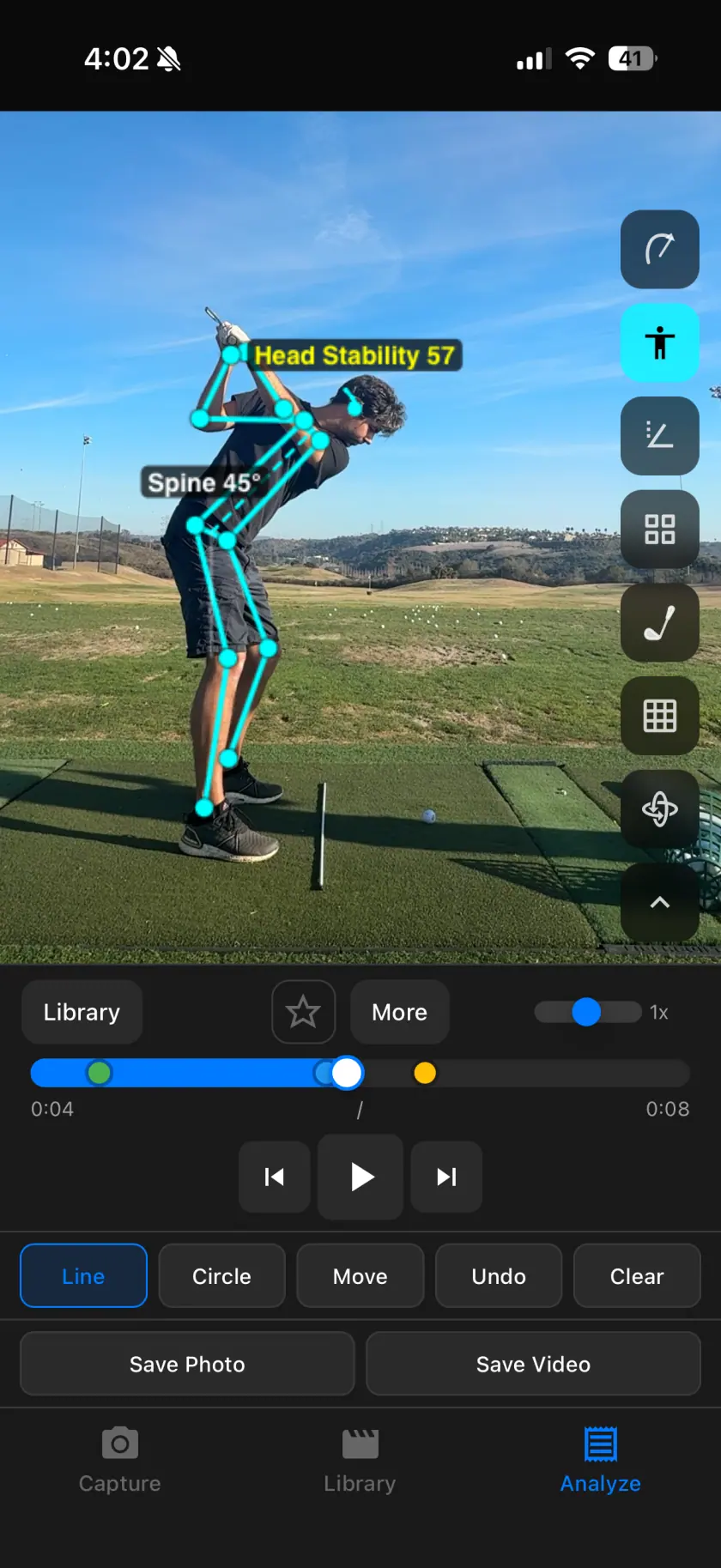
What the tracking values mean
Head Stability: a movement score from 0 to 100
Higher means less accumulated movement of the tracked head point in the video image. The tracker selects a usable nose or ear landmark, smooths its position, and adds accepted movement between analyzed frames from detected address up to impact. The score updates through that interval and holds after impact. It measures accumulated travel, not simply the distance from the starting position.
The movement is scaled to the golfer’s estimated torso size. The score is 100 minus 200 times that movement-to-torso ratio, rounded and limited to 0–100. For a calculation example, movement equal to one quarter of the estimated torso size produces 50. A score of 57 is not 57% accuracy or a grade for your swing. Camera movement, tracking gaps, detected phase timing, and the torso estimate affect it. If torso landmarks are unavailable, the calculation uses a fallback size, so avoid comparing that score across clips.
Spine angle: a line measured against vertical
The overlay joins the midpoint of the detected hips to the midpoint of the detected shoulders and reports its angle from vertical in the camera image, rounded to whole degrees. The visible label shows the angle’s magnitude. “Spine 45°” therefore describes an image-plane reference; it does not establish a correct posture or measure the spine in three dimensions.
Missing or unreliable points
Frames without a usable head point are skipped, and large tracking jumps are filtered. Missing shoulder or hip points can prevent angle calculation. A smooth trace or high score does not prove that every detection was correct. Compare the overlay with the unmarked video before using it to judge a change.
A simple check before trusting an overlay
- Watch the unmarked clip first. Make sure you can see the movement you want to review.
- Enable one tracking layer. Start with the body or club instead of filling the frame with every tool.
- Step through the checkpoint. Look at the actual body or club as well as the tracked points.
- Set aside mismatched tracking. If a point drifts away from its subject, use the original video and a manual reference for that section.
- Keep a note about uncertainty. A clear question is more useful than treating every label as a diagnosis.
When the recording needs work
Motion blur, an obscured club, cropped limbs, and an unsteady camera can make the result harder to review. Record a short test in good light with the golfer and club fully visible. The recording guide explains repeatable positioning; the path guide covers trace problems.
What SwingDraw does not claim to do
These tools do not measure ball flight or provide an automatic coaching diagnosis. A single view does not establish three-dimensional mechanics. Use matched clips to examine a change, then bring the evidence to an instructor when you need interpretation.
What is included in the purchase?
Tracking, drawing, frame-by-frame playback, comparisons, notes, and exports are included. There is no separate subscription for AI overlays. See current pricing and device requirements before downloading.
Your next range session,
on the record.
Record or import a swing, mark the frame that matters, and compare it with last week. Every tool is included.